Payment succeeds
The payments service reports payment.succeeded. The Order API confirms the warehouse reservation and returns an order confirmation to the storefront. The customer sees a thank-you message.
PLANTUML EXAMPLE / CHECKOUT
An order needs more than a successful payment. This example shows how a storefront, Order API, payments service and warehouse coordinate an inventory reservation—and release it when payment is declined.
Open, explore and edit without an account. This prepared example uses no AI credits.
The customer places an order through the storefront. The Order API checks availability and reserves inventory before creating a payment. The alt fragment describes two possible outcomes.
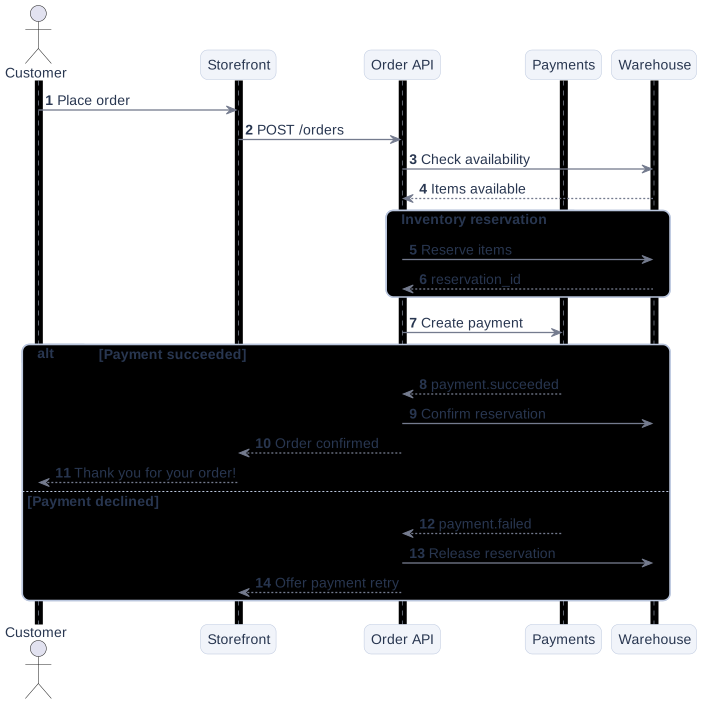
The payments service reports payment.succeeded. The Order API confirms the warehouse reservation and returns an order confirmation to the storefront. The customer sees a thank-you message.
The payments service reports payment.failed. The Order API releases the reservation and asks the storefront to offer a payment retry. The diagram does not yet model what happens during that retry.
group collects the reservation steps. alt and else separate payment outcomes. You can copy this source or download it as a .puml file.
@startuml
autonumber
actor "Customer" as User
participant "Storefront" as Web
participant "Order API" as API
participant "Payments" as Pay
participant "Warehouse" as Stock
User -> Web : Place order
Web -> API : POST /orders
API -> Stock : Check availability
Stock --> API : Items available
group Inventory reservation
API -> Stock : Reserve items
Stock --> API : reservation_id
end
API -> Pay : Create payment
alt Payment succeeded
Pay --> API : payment.succeeded
API -> Stock : Confirm reservation
API --> Web : Order confirmed
Web --> User : Thank you for your order!
else Payment declined
Pay --> API : payment.failed
API -> Stock : Release reservation
API --> Web : Offer payment retry
end
@endumlCreate payment in the diagram and follow it to the source.These are review questions, not implemented guarantees. Add the branches your actual system needs.
Explore the prepared diagram, edit the source and export your version.